Tuesday, October 19, 2021

Bellingham MakerFaire Results

Gallery of Bellingham Makerfaire interactive booth results:

1st firing (bisque)

All of these were designed on the spot 10/9/21 by 1st-time users of my sculpting software built for the makerfaire the week before (see previous post).


Monday, October 4, 2021

Contact-free-throwing

Use your hands to make digital vases that will be 3d printed out of porcelain!


10/3/21

1.Fire up TOUCHDESIGNER 88.

2. My install of TD88 no longer works with my leap motion devices. I guess that is to be expected since I haven't tried to use these together in almost a DECADE...Thanks to this video the leap motion is running again.
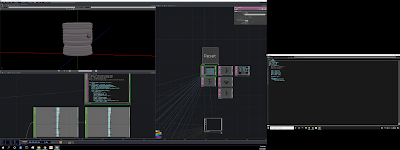
3. Figure out what the heck to do next...

4. 10/4/21
Day2: Make it better! Added limits for over and underhangs. Find a way to save to .obj files. The geometry types had to be a certain kind for the points in OBJ files to work. OBJ saver found in the Touchdesigner forums with a simple search.

5. 10/6/21
Day3: Test slicing, it works! Simplify 3d can turn my monsters into art! Tested the UI on Mike and Deb today, it was okay, but Deb's laptop doesn't handle live SOP updates very well. Tested around 5 fps on the studio laptop.
Steps for tonight: add highlights to the layer being moved, maybe a color change. Build out the performance UI to include multiple views (X&Z) plus an overhead map of the hand vs geo.

6. 10/8/21 Added a user interface with front and side views, as well as measurements, and a save indicator.
Here is an exported obj file:


Wednesday, September 29, 2021

After years... this is a life changer.  I feel grateful and stupid. For anybody that has a second 4k monitor.

https://www.alphr.com/microsoft/microsoft-windows-10/1001272/how-to-set-display-scaling-in-windows-10/

Saturday, September 11, 2021

Wednesday, September 1, 2021

USB data revovery

So, every recovery software for windows 10 is either trialware or buried too far down the google search. Lets try linux, there is always free or opensource applications. Let's fire up an Ubuntu virtual machine guest on my win10 host. Problem: my guest can't access my USB device! After a few days of research, I have found somebody else's solution:

  1. Safely unplug your USB devices from the host if any are plugged in.
  2. Open VBox then close it again to release any USB devices that may still be captured in the VM.
  3. Delete the UpperFilters entry, if it exists, in the host registry -

    • Open the Windows registry: Start (right-click in Win 10) > Run and type regedit.
    • Navigate to HKEY_LOCAL_MACHINE\System\CurrentControlSet\Control\Class\{36FC9E60-C465-11CF-8056-444553540000}.
    • Delete the UpperFilters entry if it exists.
    • Note: This entry did not exist on my system.
  4. Manually re-install VBox USB drivers on the Windows host -

    • Open folder C:\Program Files\Oracle\VirtualBox\drivers\USB.
    • Open subfolder device, right-click driver file VBoxUSB.inf, and click Install.
    • Open subfolder filter, right-click driver file VBoxUSBMon.inf, and click Install.
    • Reboot the Windows host system just to make sure the drivers are loaded.
  5. Plug in your USB devices.
  6. Open VBox and run the VM.
  7. Click any devices in the VM's Devices > USB menu list, and they should mount OK. (Hovering the mouse over the USB icon on the VM's status bar in the lower right corner of the VM will show the USB devices attached.)

Genius. Here it is, as a reminder. Back onto the recovery. While selecting the drive to recover, I realize that I created a 25GB virtual disk, not nearly enough to hold the recovered files from a 128GB SD card. Going to have to share my TB storage drive with my virtual machine. sudo adduser $USER vboxsf. Log out/in. Trying PhotoRec... going to bed...

Sunday, February 28, 2021

Pinky buildLog

 Pinky, the octopod AI robot.

Goals: Learn more engineering tricks: Mechanical, Electrical, Software. 

  • Mechanical engineering; Gearing, Servos, Bearings, Nuts, and Bolts.
    • Designed in Fusion 360, then export URDF for ROS.


  • Electrical engineering; Battery (Li-Po), Voltage Converter (5V, 10amp), Microcontroller (pi Pico), Microprocessor (pi Zero W), PWM control board (PCA9685)
  • Software engineering; Windows with Ubuntu VirtualBox (lubuntu20.04), ROS noetic.

Progress videos:

JointControl:
Stand command:x)

In depth details:

  1. knee/hip joints. Drive gear tooth count are: ankle=9t(2x), knee=12t(1.5x), hip=20t(0.9x)
  2. 12ish Volt Li-Po -> voltage converter -> 5-6volts -parallel> 2 PCA9685s v++ terminals
  3. Software
    1. Set up Ubuntu VM
      1. Enable shared clipboard, folder - guest additions
    2. Install ROS on VM 
    3. Configure ROS ENV 

V2 - 2/9/24

Knee and ankle servos have been upgraded to MG996Rs
  • Max Torque @ 4.8V =  9.4 kgf*cm
  • Speed 0.17 s/60 degrees
  • Knee gear ratio: 18:12
  • Ankle Gear ratio: 14:10
  • Ankle torque: 14kgf*cm
  • Knee torque: 15
  • Ankle speed(no load): 257.1 deg/sec 
  • Knee speed(no load): 235.29 deg/sec
 and Hips are:
  • Geared @ 18:9?
  • MG90S(6)
    • Torque 2KG/cm 
  • POWERHD 1810MG(2)